Internship at Unix-Solutions
During my internship at Unix-Solutions, a Belgian cloud and infrastructure provider with its own datacenters, I was involved in a variety of hands-on tasks focused on automation, infrastructure deployment, and network management. This experience gave me valuable insight into real-world datacenter operations and highlighted the importance of efficiency and reliability at scale.
Key Responsibilities & Projects:
-
Linux Mirror Setup: I set up a highly available public Linux package mirror to serve the open-source community. To ensure fair usage and performance stability, the mirror is rate-limited and runs on 2 physical servers to allow for load balancing and failover. This not only optimized internal usage but also gave back to the wider Linux community.
-
Out-of-Band Management Network: I designed and started to deploy a new quad WAN out-of-band management network, enabling secure and independent access to server management interfaces, even in the event of the failure of the entire datacenter network.
-
Automated Server Provisioning with Foreman: I implemented Foreman to automate server installations using iPXE boot, autoinstall scripts, and custom post-installation tasks (using ansible).
-
Self-Service Bare-Metal Deployment Prototype: I extended the provisioning system to create a prototype self-service solution, allowing customers to order a bare-metal server and have it automatically installed and ready to use within two hours, entirely without human intervention. This creates the basis for a potential IaaS product for physical infrastructure.
-
Additional Datacenter Tasks: I also supported day-to-day datacenter operations, such as setting up new PDUs, installing servers for customers, replacing failed hardware
Unix-Solutions Mirror
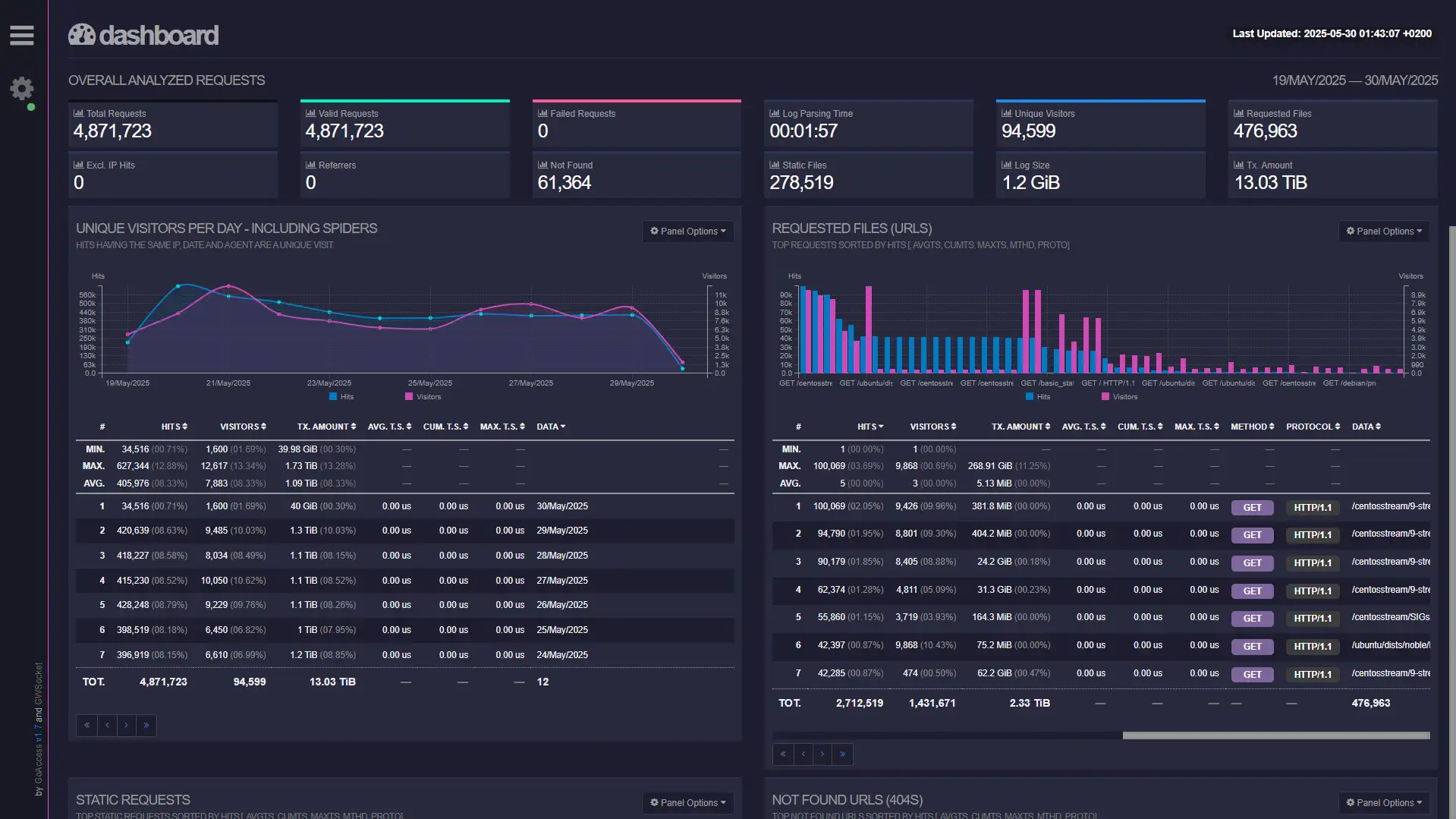
As part of my internship at Unix-Solutions, I was responsible for designing and deploying a public, highly available Linux mirror. A mirror is a server that hosts copies of installation images (ISOs) and software package repositories used by various Linux distributions. These mirrors allow users and systems to download updates and software quickly by connecting to a geographically or network-topologically closer source. The goal was to contribute to the open-source community while ensuring high performance and resilience for internal and external users.
Key Features:
- Distribution Syncing: I created custom scripts to synchronize various Linux distributions, following each distro's official mirroring guidelines to ensure compliance and reliability.
- Infrastructure Setup: I deployed and configured the physical and virtual servers that run the mirror. The infrastructure includes two mirror nodes with failover and load balancing handled by Keepalived and HAProxy, ensuring high availability and redundancy.
- Full Mirror Synchronization: Both mirrors are kept fully in sync using two custom Python scripts, which handle the scheduling, logging, and error management of all synchronization tasks.
- Monitoring and Alerting: I implemented a monitoring system to detect failed syncs, missing files, or broken links. This allows for quick intervention in case of any issues with upstream mirrors or internal systems.
- Security and Traffic Control: To protect the service, I integrated CrowdSec for threat detection and prevention. Due to the nature of mirror traffic, I selectively disabled some rules to avoid false positives and unnecessary blocking of legitimate users.
- User Interface and Debugging Tools: I designed a lightweight PHP front-end for the mirror to improve user experience. As a subtle easter egg (and useful debugging feature), the site shows which mirror node the user is connected to (when you look at inspect element). This assignment is sticky per IP, enabling consistent access during sessions.
- Rate Limiting: To ensure fair usage and protect against abuse, the mirror is publicly accessible but rate-limited, balancing community contribution with service stability.
This project combined scripting, infrastructure automation, security hardening, and frontend development—offering a well-rounded experience in building a production-grade service from scratch.
Out of band network
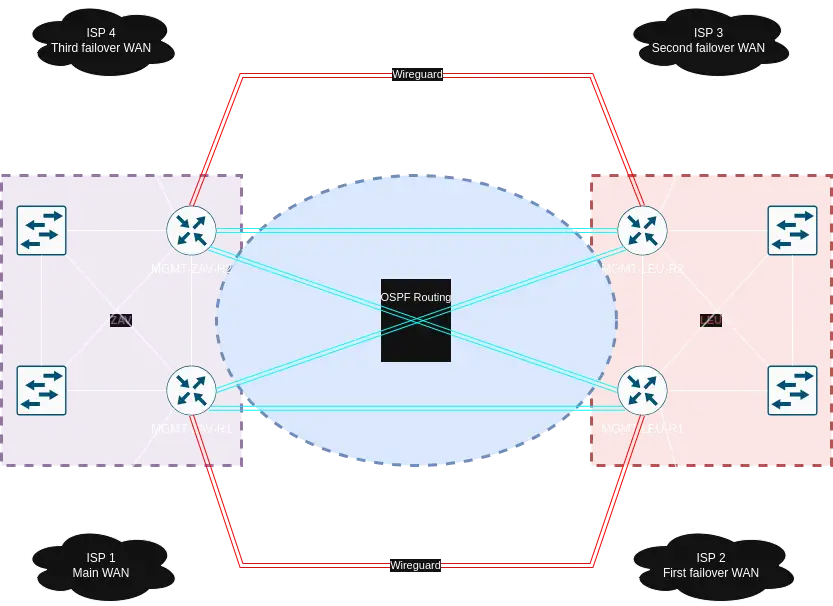
I was responsible for designing and deploying a robust and redundant Out-of-Band (OOB) management network spanning multiple datacenters. This network ensures continued access to management interfaces even during production network failures, and it was built with high availability, failover, and remote accessibility in mind.
Architecture and Design:
- The OOB network consists of four identical management routers, each located in a separate rack within the meet-me-rooms of the datacenters.
-
Each router has:
- Its own dedicated WAN uplink
- A link to both local OOB switches in each datacenter
- VPN tunnels to the other routers for redundancy and remote access
- The datacenters are interconnected using four DWDM channels running over dark fiber links, allowing high-speed, low-latency communication between sites.
Routing & Redundancy:
- OSPF is used to dynamically distribute routing information between the routers.
- All management routers have individual WAN connections, but traffic to internal, firewalled servers exits through a single designated WAN to maintain consistent external access policies. OSPF handles automatic failover in case a WAN link goes down.
- Meanwhile, VPN tunnels always exit through each router's own WAN, preserving their ability to remain independently accessible.
Custom Configuration:
Due to the complexity and uniqueness of this setup, I wrote custom OSPF and firewall rules to manage traffic flows, route propagation, and failover behavior. These rules ensure proper handling of asymmetric routing scenarios and maintain secure access across all sites.
Failover Scenarios:
- If a WAN link fails, OSPF automatically reroutes internal traffic through the next available uplink.
- In the event of a dark fiber cut, traffic is automatically rerouted over the VPN tunnels between the sites, ensuring uninterrupted OOB connectivity.
This OOB network provides a highly resilient and flexible backbone for remote server management, allowing the operations team to maintain control even during critical network failures.
Automated Server Provisioning with Foreman
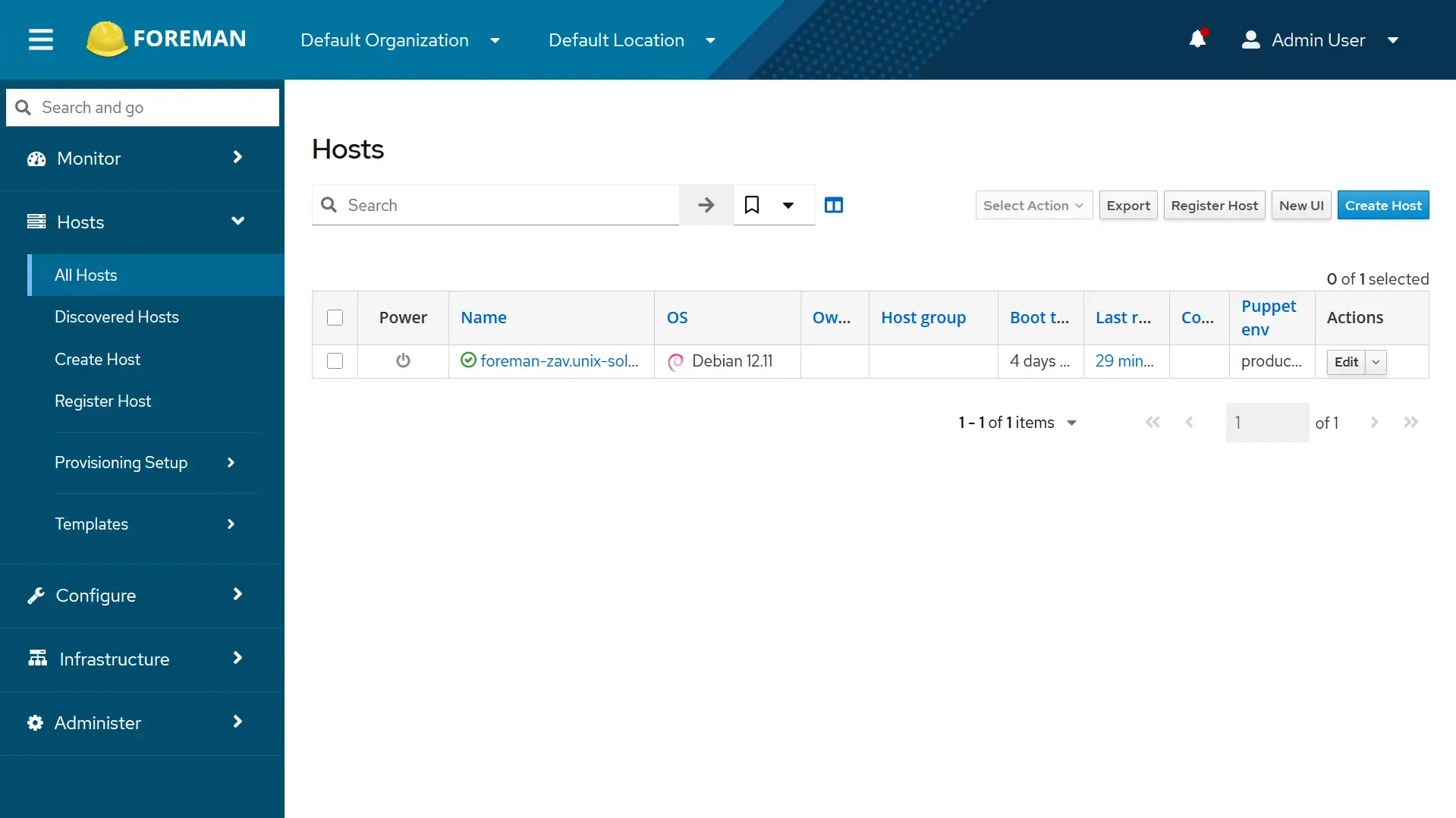
As part of my work at Unix-Solutions, I set up an automated system for provisioning and configuring servers and workstations. The goal was to reduce manual interventions to deliver faster and more consistent new servers, and to streamline onboarding for both infrastructure and end-user devices.
Automated OS Installations:
I set up unattended installation workflows for:
- Debian and Ubuntu servers
- Proxmox hypervisor hosts
- Workstations for new employees or interns, following ISO-compliant installation standards
For the workstations, users can choose between Ubuntu or Debian, each available with KDE or GNOME desktop environments.
Post-Installation Automation with Ansible:
Once the base operating system is installed, Ansible handles all post-install configuration. The system supports:
- Custom hostnames, static or dynamic IP addresses, DNS and NTP servers
- Interface and IP configuration (including multiple automatically detected NICs and VLANs)
- SSH configuration (authorized keys or passwords)
- Creation of user accounts (with sudo privileges)
- Configuration of custom mirrors
This fully automated process ensures that each system - whether a server or a desktop - is deployed quickly and securely, without leaving a trace.
Self-Service Bare-Metal Deployment Prototype

This project was developed as an advanced extension of the automated provisioning system, with the goal of enabling customers to deploy bare-metal servers on demand - completely unattended and ready to use within two hours.
Workflow Overview:
The prototype is built to install and configure a brand-new Dell server from scratch, following a fully automated sequence:
- RAID Configuration: The server's management interface (iDRAC) is used to automatically configure a RAID 1 array for the operating system drives.
- Hardware Discovery & Verification: Once configured, the system powers on the server, verifies its hardware specifications, and ensures they match the requested configuration.
- OS Installation & Configuration: The server is then provisioned with the selected operating system and custom settings using the existing automation pipeline. This includes hostname, IP configuration, SSH keys, user setup, and more.
- Secure Password Handling: After the installation is complete, the system generates and stores a secure password (which has to be changed on first login), then powers off the server to prepare for final deployment.
- Network Setup: The connected switch port is reconfigured if permitted by the system policies. Once the server is placed in the WAN VLAN, the port is locked down to prevent further changes.
- Final Boot & Customer Handover: The server is powered on, given a brief period to fully boot, and then the login credentials and connection details are securely sent to the customer (using strongpasswordgenerator.be).
Key Features:
- Fully unattended deployment process
- Integration with server management interfaces and switch automation
- Built-in verification and hardware checks
- Secure handoff and access control
- Optional constraints on port reconfiguration to prevent misuse
This system demonstrates a step toward delivering Infrastructure-as-a-Service (IaaS) for physical hardware, merging automation, orchestration, and network control into a seamless self-service platform.